 爵特猛博客
爵特猛博客
小程序笔记——scroll-view聊天框的定位
- 爵特猛
- 2018-7-25 09:48
- PHP
- 3437
做聊天功能的时候,前端需要用到一个组件scroll-view,实现能够进行滚动的聊天信息界面,具体用法可阅读小程序开发文档。
但是,在应用过程中发现问题,scroll-view组件的可视内容是默认固定在顶部位置的,这就影响了用户在聊天时看不到最新消息。
最初,想到的解决办法是,scroll-view有个属性——scroll-top,属性的类型是number。

我们的聊天页面是竖向的,scroll-top则可以设置竖向滚动条位置,可以用scroll-top实现定位到最新消息的高度。
代码实现:
js部分代码:
先在data声明一个scrollTop变量,用于获取聊天信息记录所计算到的scroll-view的最大高度。
data: {
    __IMAGE_PATH__: app.__IMAGE_PATH__,
    chatlist:[],//聊天内容
    userInfo:[],//我的信息
    otherInfo:[],//对方的信息
    scrollTop:0,
}
在成功发送消息后,接着写以下代码
var chat_height = 0;//滚动聊天消息的高度
var chat_num = 1;//聊天消息数量
//发送消息后定位到最新消息处
wx.createSelectorQuery().selectAll('.chat_item').boundingClientRect(function (rects) {
    //循环所有消息条数
    rects.forEach(function (rect) {
        chat_height += rect.height  // 节点的高度累加
        chat_num++;
    })
    that.setData({ scrollTop: chat_num * chat_height, })
}).exec()
前端代码:
<!-- 聊天框 -->
<scroll-view scroll-top='{{scrollTop}}' scroll-y style='height:{{ww_height}}px'>

    <!-- 一条完整的信息内容 -->
    <view class="chat_item" wx:for="{{chatlist}}" wx:key="key">
        <!-- 发送消息时间 -->
        <view class='speak_time' wx:if="{{item.timeshow}}">{{item.timeshow}}</view>

        <view class="clear"></view>
        <!-- 右侧消息 -->
        <view wx:if="{{item.unionid==unionid}}" class='my_party'>
            <view class='my_img'>
                <image class='my_pic' src='{{userInfo.headimgurl}}'></image>
            </view>
            <view class='my_content'>
                  <view class="triangle_right"></view>
                  <view class='triangle_right_inside'></view>
                  {{item.text}}
            </view>
        </view>
        <!-- 左侧消息 -->
        <view wx:else class='other_party'>
            <view class='other_img'>
                <image class='other_pic' src='{{otherInfo.headimgurl}}'></image>
            </view>
            <view class='other_content'>
                  <view class="triangle"></view>
                  <view class='triangle_inside'></view>
                  {{item.text}}
            </view>
        </view>
        <view class="clear"></view>

    </view>

</scroll-view>
这时每次发送完消息,scroll-view就会自动更新到最底部。
但是,完成之后发现一个问题,因为在JS中计算获取scroll-view的高度时,'.chat_item'类的个数还是我发送消息之前的数量, 最新发送的消息在计算时并未生成新的'.chat_item',而最新的'.chat_item'在视图渲染的时候通过循环chatlist时生成,因此JS中的scroll-top最大也只能定位在发送新消息之前的高度(也就是最新的第二条消息的位置)。
既然,视图页面是通过循环chatlist变量生成的'.chat_item',那我们就换另一种思路进行解决定位问题。
小程序scroll-view组件中除了scroll-top属性能够定位之外还有一个属性也能够定位,那就是scroll-into-view。通过设置scroll-into-view属性的值来定位到scroll-view里某个id标签的位置。
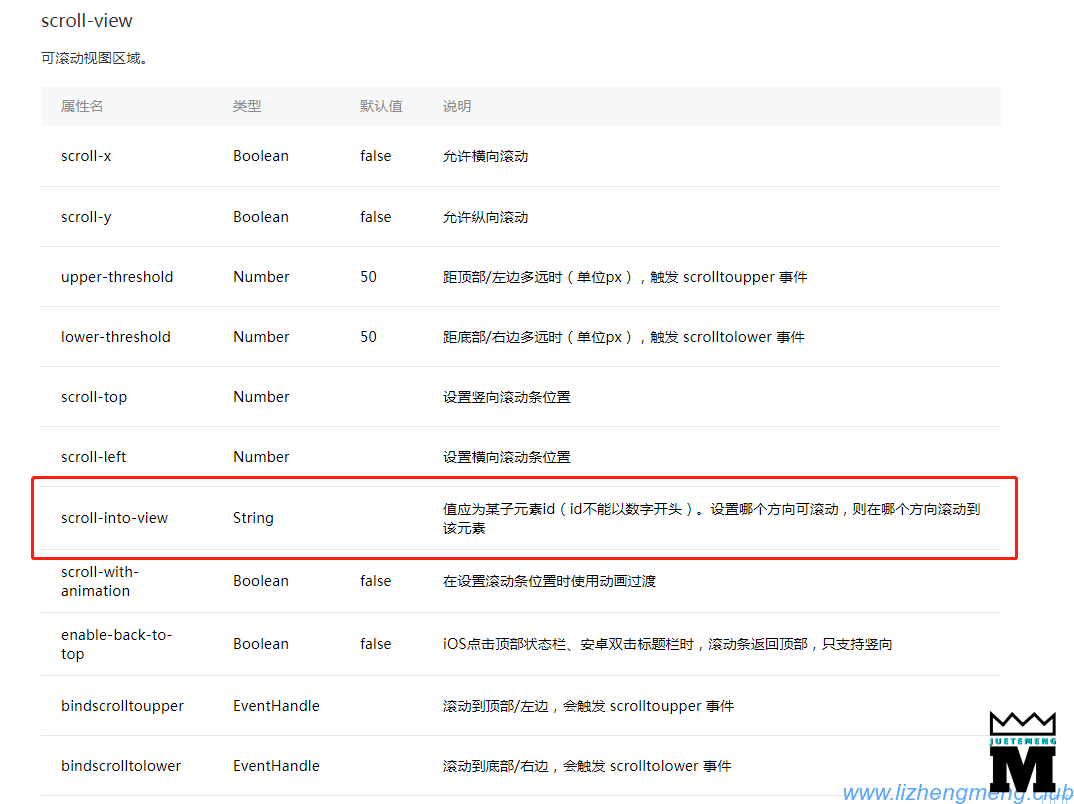
使用scroll-into-view属性就不需要使用scroll-top属性了。
前端的代码需要作出调整:
<!-- 添加scroll-into-view属性,值为 chat_+‘最新消息的索引值’ -->
<scroll-view scroll-into-view="chat_{{chatlist_count}}" scroll-y style='height:{{ww_height}}px'>
    <!-- 这里根据循环的索引值添加id,用于定位 -->
    <view id="chat_{{index}}" class="chat_item" wx:for="{{chatlist}}" wx:key="key" wx:for-index="index" >

      <view class='speak_time' wx:if="{{item.timeshow}}">{{item.timeshow}}</view>

    <view class="clear"></view>
    <view wx:if="{{item.unionid==unionid}}" class='my_party'>
        <view class='my_img'>
          <image class='my_pic' src='{{userInfo.headimgurl}}'></image>
            </view>
            <view class='my_content'>
                <view class="triangle_right"></view>
                <view class='triangle_right_inside'></view>
                {{item.text}}
            </view>
        </view>
        <view wx:else class='other_party'>
            <view class='other_img'>
                <image class='other_pic' src='{{otherInfo.headimgurl}}'></image>
            </view>
            <view class='other_content'>
                <view class="triangle"></view>
                <view class='triangle_inside'></view>
                {{item.text}}
            </view>
        </view>
        <view class="clear"></view>

    </view>
</scroll-view>
JS代码就简洁了很多:
还是先在data处声明一个全局变量chatlist_count
data: {
    __IMAGE_PATH__: app.__IMAGE_PATH__,
    chatlist:[],//聊天内容
    userInfo:[],//我的信息
    otherInfo:[],//对方的信息
    chatlist_count:0,//最新消息的索引值(也就是消息列表的长度-1)
}
在发送消息后,也不需要计算高度了,只需要获取消息列表的数组长度就行。
that.setData({
    chatlist: newchatlist,
    chatlist_count: newchatlist.length - 1,//定位显示最新一条消息
});
至此,聊天消息的定位问题就解决了,每次发送消息后都会自动定位到最新消息处。


爵特猛